What Is Cover Glass for Monitor?
A monitor’s front surface may look like one continuous sheet, but it can contain several layers. Cover Glass For Monitor usually means the protective glass panel placed over a display module. It helps shield the screen from scratches, dust, and everyday contact. It may also create a smoother surface for cleaning.
The exact construction depends on the monitor. Some models use chemically strengthened glass, while others use different protective materials. A touch monitor may bond its cover glass to a touch sensor, helping keep input responsive and reducing the gap between layers. Non-touch models may use glass mainly as a barrier. Small details matter: thickness, edge shape, surface coating, and optical clarity can affect fit and viewing comfort. There is no single specification that suits every screen.
Names can be confusing. Still, the distinction matters. Cover glass is not always the display itself, and replacing it may require matching the original dimensions and optical properties. A panel that looks compatible could introduce glare, touch problems, or visible distortion. Check the monitor’s model information before choosing a replacement, and consult its manufacturer or a qualified repair provider when specifications are unclear. Even careful measurements may not reveal every bonding or coating detail. That uncertainty is worth keeping in mind. This guide explains what monitor cover glass does, how it differs from other screen layers, and which practical factors to consider.
What Cover Glass for a Monitor Is
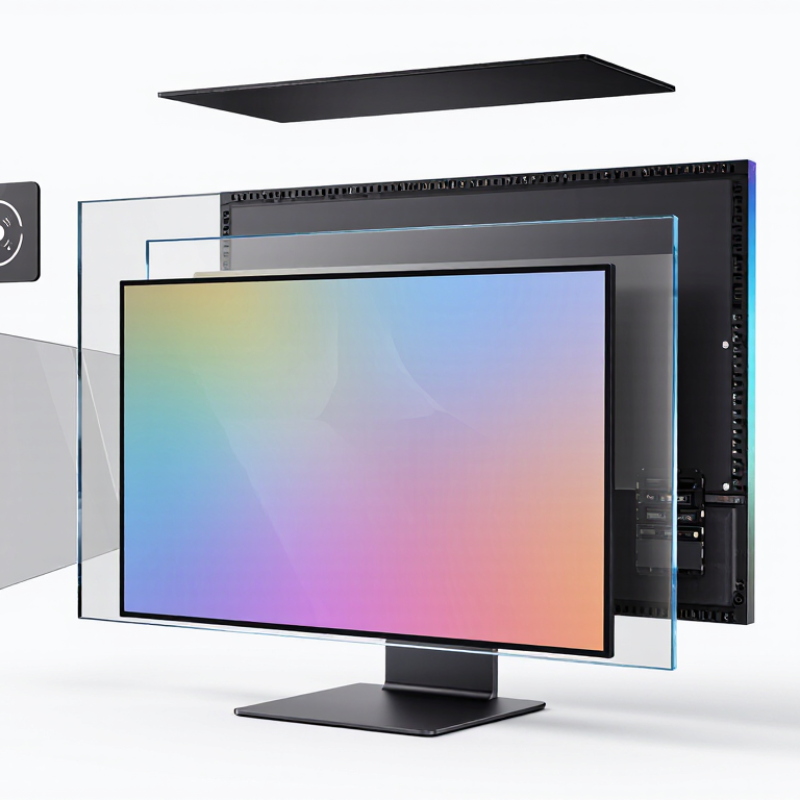
Cover glass for a monitor is a transparent outer layer placed over the display to help shield its surface. It is not the screen itself: the image is produced by the display panel beneath it. Depending on the monitor, the glass may be bonded directly to the panel or installed with a small gap. That construction affects reflections, touch response, and how easily dust can collect between layers.
The glass can help guard against everyday scratches, fingerprints, and light bumps, but it is not damage-proof. Some monitors use strengthened glass, while others have a clear protective coating or a different surface material. A detail that is easy to miss: “cover glass” does not always mean a removable sheet. Removing a bonded layer can damage the display, so check the manufacturer’s service information before attempting repairs. Glass may also add reflections in a bright room.
Tips: Clean with a soft microfiber cloth and gentle pressure. Avoid gritty towels and harsh cleaners, which may wear down coatings. If glare bothers you, check the monitor’s finish and room lighting before adding a separate film. The fit matters.
How Monitor Cover Glass Is Made and Structured
Monitor cover glass is the transparent outer sheet that protects a monitor’s display surface. It is separate from the image-forming LCD or OLED panel beneath it. Its job sounds simple. In practice, it must pass light clearly, resist everyday scratches, and limit glare without making colors look dull. Thickness and edge shape affect both feel and fit.
Production usually begins with flat glass cut to the required dimensions. The edges are ground and polished, since rough edges can become stress points. Heat treatment or chemical ion exchange may strengthen the sheet; the method depends on glass composition and design. After cleaning, manufacturers may add anti-reflective, anti-glare, or fingerprint-resistant coatings. Each layer needs careful control. Dust can show.
The final stack varies. A basic monitor may place cover glass above an air gap and display panel. A touch model can include a sensor layer, while optical bonding fills the gap with clear adhesive to reduce internal reflections. Not every monitor uses bonded glass. Adhesive thickness, coating uniformity, and alignment matter; a small mismatch can create haze or uneven color. Protection has limits: glass can still crack under impact, and coatings can wear with harsh cleaning. This trade-off deserves attention.
The Main Functions of Monitor Cover Glass
What Is Cover Glass for Monitor?
The Main Functions of Monitor Cover Glass
Monitor cover glass is the transparent outer layer in front of a display. It shields the panel from dust, fingerprints, and light contact during everyday use. A sleeve zipper or desk edge can leave marks; a cracked panel is far more serious. The glass helps, but it is not armor.
Optical clarity matters just as much. ASTM D1003 provides methods for measuring luminous transmittance and haze, useful indicators of how much light passes through and how scattered the image becomes. Less haze helps small text and fine lines stay crisp. The surface can also support touch input when paired with a compatible sensor. Reflection is still a weakness. Bright windows can wash out the screen, even with a clear cover.
Impact resistance depends on the glass, its thickness, edge design, and how it is mounted. IEC 60068-2-75 defines impact-test energy levels from 0.14 to 50 joules for equipment testing; these levels are test conditions, not a guarantee that a monitor survives a particular strike. In practice, a well-fitted cover reduces routine wear, but careless handling can still damage the display beneath it. A clean cloth helps. A rough paper towel may not.
Common Types and Surface Treatments
What Is Cover Glass for Monitor? Common Types and Surface Treatments
Monitor cover glass is the outer sheet that protects a display and shapes how it looks under room lighting. Soda-lime glass is a cost-conscious option for standard screens. Aluminosilicate glass is often selected where thinner, stronger cover glass is needed. Chemical strengthening exchanges surface ions to improve resistance to scratches and impact. It is not unbreakable. Chips at the edge can still spread.
Surface treatments change the viewing experience. Anti-glare glass uses a textured surface to scatter reflections, useful beneath bright office lights. The trade-off is a slightly grainier image, especially on fine text. Anti-reflective coatings reduce reflected light while preserving a clearer, glossier appearance. Anti-fingerprint coatings make oily marks easier to wipe away, but do not prevent them. Small details matter.
Grand View Research’s 2023 display-glass report valued the global market at roughly $6.8 billion in 2022. That figure covers display glass broadly, not monitor cover glass alone, but it signals substantial demand for display materials. When comparing samples, inspect black-screen reflections, white text, and fingerprints under the lighting where the monitor will be used. Trade-offs remain.
Factors That Affect Cover Glass Selection
What Is Cover Glass for Monitor?
Factors That Affect Cover Glass Selection
Cover glass is a protective pane fitted over a monitor’s display. It helps shield the screen from scratches, dust, and routine contact. The right choice depends on how and where the monitor will be used. Small details matter.
Thickness affects weight, rigidity, and sometimes touch sensitivity. A thicker pane may feel sturdier, but it can add stress to the mounting points. For a touch display, check that the glass works with the sensor and does not make input feel sluggish. Fit matters too: measure the visible area, bezel, and edge clearance before ordering. A few millimeters can complicate installation.
Optical quality is just as important. Clear glass preserves a crisp image, while anti-glare treatments can soften reflections from overhead lights. That benefit may come with a slight change in contrast or sharpness. Hardness, coating durability, and cleaning habits also deserve attention. In a dusty workshop, easy-to-clean surfaces may be more useful than a premium finish. There is no universally best option; specifications can look convincing on paper but feel different at a desk. When possible, compare samples under the monitor’s actual lighting.
What Is Cover Glass for a Monitor? Factors That Affect Selection
Cover glass is the transparent outer layer that protects a monitor’s display. Material hardness is one factor to consider when selecting it.
Values are representative Mohs hardness figures; ranges vary by material formulation. Hardness indicates scratch resistance, not impact strength. Thickness, optical clarity, impact resistance, and operating environment also affect material selection.


 Phone
 Send Email
 whatsapp
 Facebook